Manage Series Labels is a tool that allows study staff to oversee imaging series collected for the study. The tool allows for the editing of series descriptions, choice of archiving study, determination of which series go to radiology review and provides dicom quality control tools.
To access the tool, click on Manage Series Labels from the Imaging menu and select the study you wish to manage. It is available for those with coordinator access and above or those with MR Tech permissions.
Edit Existing Labels
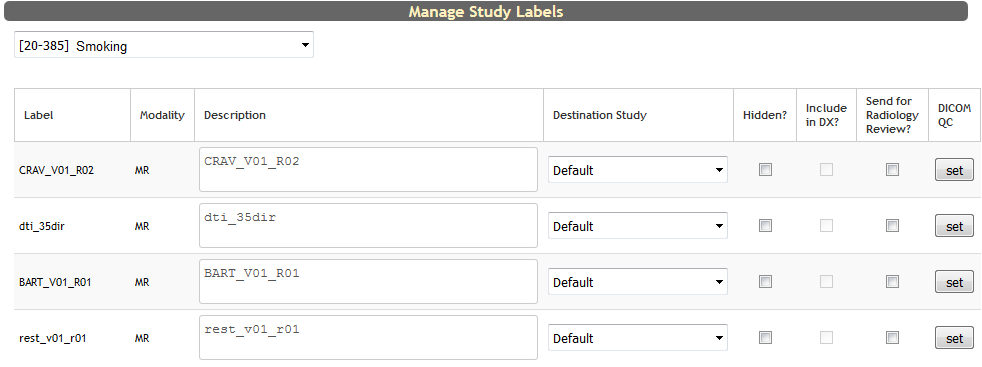 Each series that exists for a study will be listed. Now you begin to customize the following options:
- Edit series description
- Select which study this series transfers to in COINS and archive
- Choose if the series is hidden when manually adding scans
- Choose to include or exclude series in Data Exchange (study sharing rules permitting)
- Select which series are automatically sent to the radiologist for review. By default, T1, MPRAGE and FLAIR series are always sent to radiology review for sites that use COINS radiology.
- Click set to add or edit DICOM quality control parameters.
Click Commit Changes at the bottom of the page to save your changes.
Add a New Label
At the bottom of the page, you can also add a new label by filling in information to create the new label or by selecting one from another site.
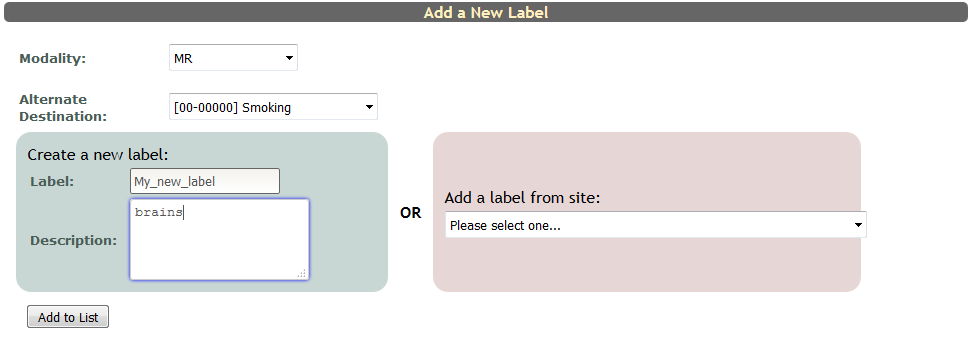
Click Add to List to add the label.
Comments