Currently in COINS, participants receive a new URSI each time they are enrolled in a study. If studies have URSI sharing in place, the URSI can be reused for the new enrollment, but currently this is the only time a new participant can be assigned the same URSI for two different studies.

When using the Query Builder export, you can choose which cover sheet information you want to include. The queried URSI is the URSI either added into the URSI field or the URSI of the study selected when selecting subjects to query. The oldest URSI is the first URSI the participant was ever assigned.
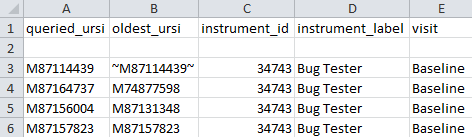
If you choose to export with oldest URSI, sometimes the URSI in the oldest_ursi column will have tildes (~) around it. This is a flag that the URSI is actually not the oldest URSI, and the oldest URSI cannot be displayed because the user does not have permissions for the study the participant was first enrolled in. Instead, the user will be shown the queried URSI with tildes as a flag.
Comments