This feature allows users to create a drop down menu of reasons for missing assessments.

To create or edit reasons go to Edit Incomplete/Missing Reasons from the Admin menu. You will see a list of existing reasons created by other studies under Please add reasons from the list below. Your existing reasons will also be displayed.
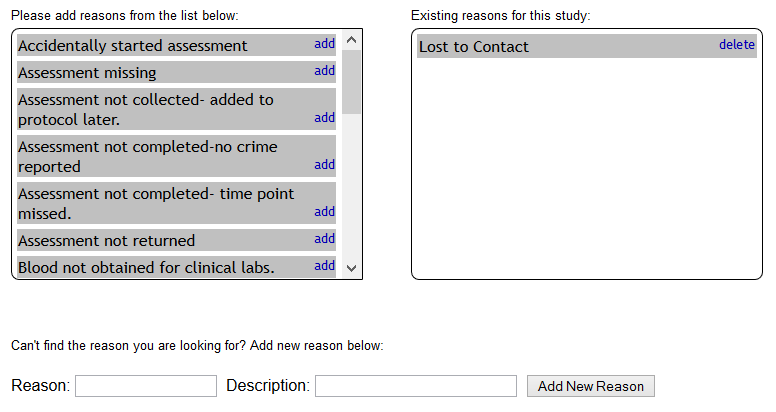
You can choose to add any of these reasons to your study by clicking add next to the reason.
You can also choose to delete an existing reason by clicking delete.
You can create new reasons by filling in the Reason and Description fields and clicking Add New Reason.
The reasons drop down will also appear if you are completing a missing assessment from the study portal's progress report.
The Site Admin for each site has the ability to enable study coordinators to create new reasons for their study. Site Admins can also share reasons across all studies at their site. This is useful for sites that want uniform reasons for missing assessments.
- Go to Site Configuration from the Admin menu in MICIS,
- Check the box under Enable studies to manage their own incomplete/missing assessment options
- Click Save at the bottom of the page.
To share reasons across all studies check the box under Share incomplete/missing assessment options across all studies at this site and click Save at the bottom of the page.
Comments