Self Assessment
This is an online data collection tool. The subjects fill out questionnaires on their own and then submit them to a Review queue. The research staff review the assessment and can either submit it as a Complete record or deny it and send back to the subject for clarification or completion. This tool also eliminates the need for data entry.
Data Entry
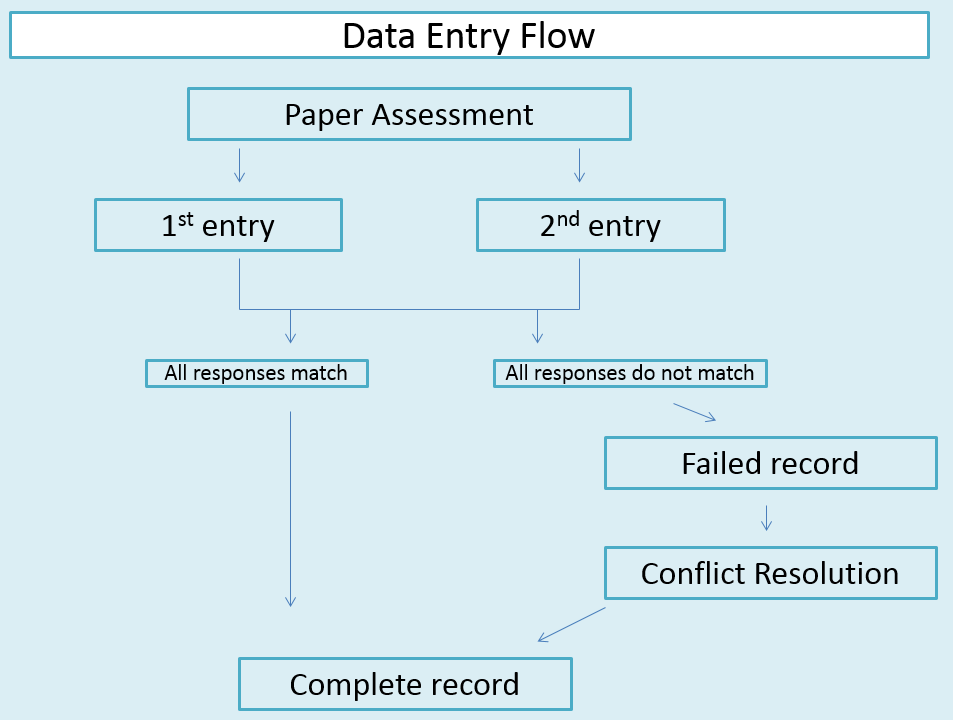
COINS has a dual data entry system and supports options for direct and on-going entry.
- Dual Entry: For each paper record there is a 1st entry and a 2nd entry. If those two entries match a Complete assessment is created. If there are discrepancies between the two entries a Failed assessment is created. Failed assessments are sent to Conflict Resolution where the discrepancies can be viewed and corrected to match the paper record. Once the conflicts are resolved a Complete assessment is created.
- Direct Entry: This mode only requires one entry. It should be used while interacting directly with the participant. It should not be used if entering data from paper.
- On-going: this mode also only requires one entry. It should be used while interacting directly with the participant. It also can be used for assessments that are collected throughout a study by multiple entry operators. It should not be used if entering data from paper.
- Provisional is meant for imported assessments only. It allows existing assessments to be re-imported, overwriting the matching assessment with the newly imported assessment. This is recommended for data that is continually being updated and is exported from another source. To enable provisional entry mode, the max instance for the instrument must be set to 1.
oCOINS (formerly Tablet)
Data collection tool for research staff to collect assessment data on a computer without internet access. With oCOINS the user can submit the data directly to the database after an internet connection has been established. This eliminates the need for data entry and internet availability at the time of assessment collection.
Comments